Scheduler Overview
This guide shows you how to configure and use the Cirrus Shield Scheduler application to efficiently plan your missions in relation to your resources and locations.
Initial Scheduler Configuration
- Go to Setup, then to the Connected Apps tab and make sure the Scheduler application is listed there.
- Go to the Extensions tab and check that the Scheduler extension is present.
- If the extension is not present, download it by clicking the plus icon, then selecting it from the list.
- Click Details for this extension from the list
- A page describing the Scheduler opens.
- Click the Configure the scheduler button to go to the next step.
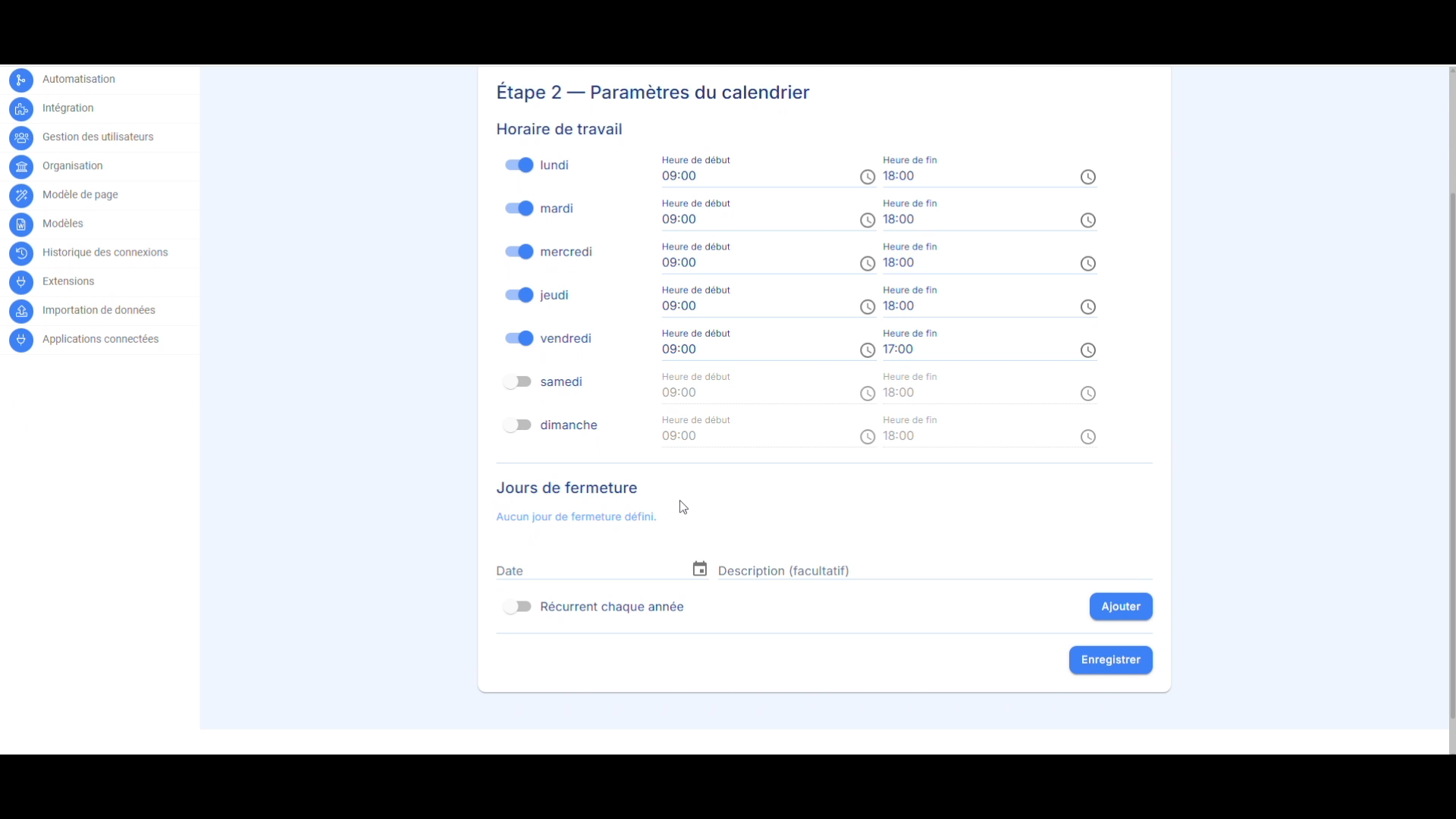
Working Hours and Closure Days Configuration
- Enter your company’s working hours for each day of the week.
- Add closure days. These can apply to a single year or repeat every year.
- Then click Save.
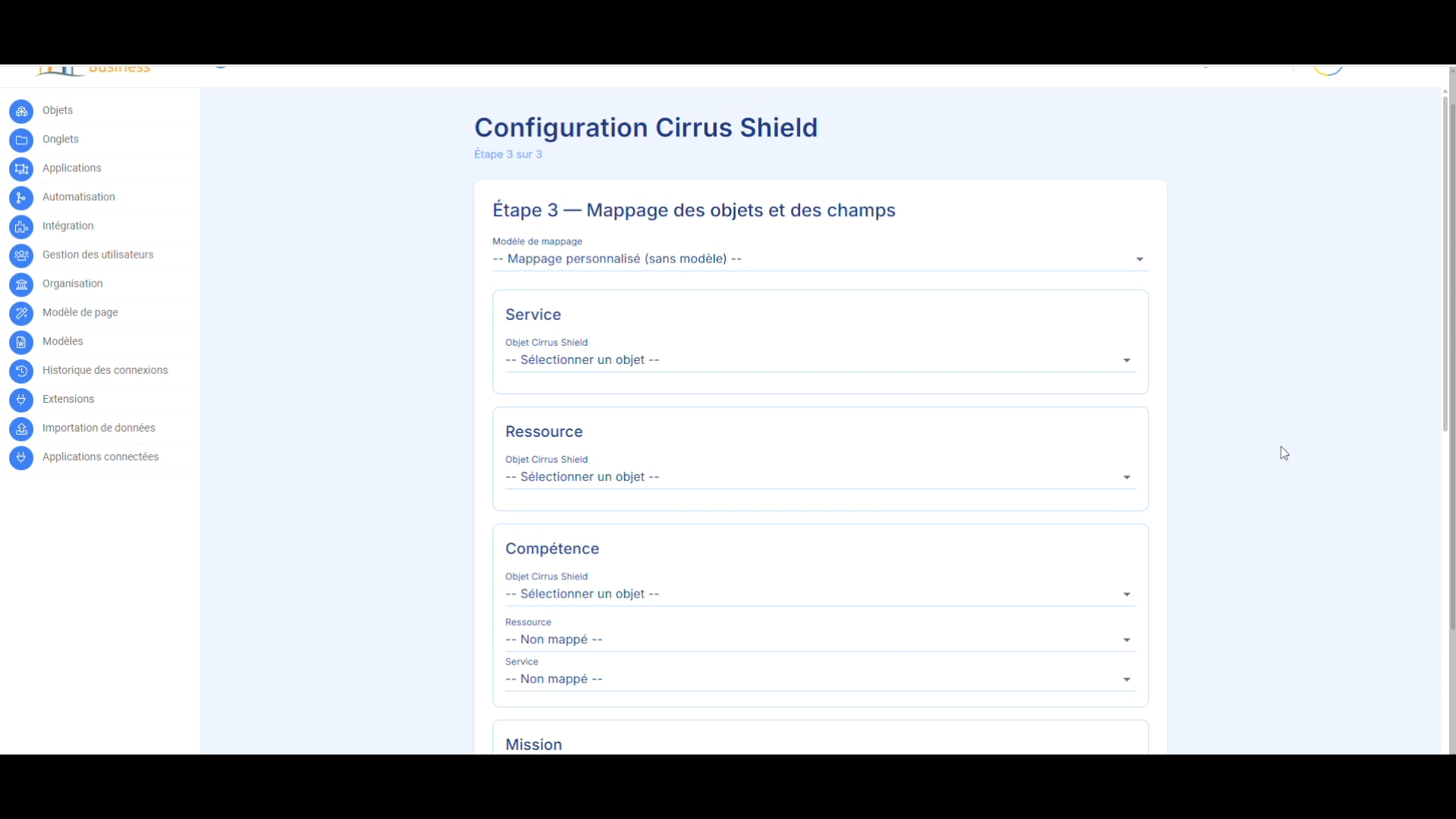
Object and Field Mapping
- Match the objects and fields with the Scheduler.
- If your industry is listed in the mapping template, select it for automatic mapping, provided you have the corresponding objects and fields.
Cirrus Shield Generic Role Mapping — AlistonScheduler
The scheduling engine does not hard-code any object or field name. Each generic role below is mapped once, per organization, in the Mapping step of the /config wizard. This document describes the generic vocabulary — never the actual names used by a specific organization.
How to read a sheet:
Cirrus Shield Object — always chosen manually for each organization; no default value, never a field.
Fixed Field — API name assumed identical across all organizations. Does not appear in the wizard; a correction is made directly in the database if the organization differs.
Field to Map — offered as a dropdown in the wizard; the administrator selects their organization’s actual field.
01 — Service (GenericRole.Service)
The offer or product a Mission is linked to — used to filter which Resources are qualified via a Skill.
Cirrus Shield Object to choose — required.
Fixed Fields
| Generic Field | Cirrus Shield API | Description |
|---|---|---|
| Nom | Name | Displayed name of the Service. |
| CodeProduit | Product_Code | Internal product/offer code, used as a readable identifier. |
Fields to Map
| Generic Field | Description |
|---|---|
| (none) | — |
02 — Resource (GenericRole.Resource)
The person, room, or equipment being scheduled — the one who occupies a Slot.
Cirrus Shield Object to choose — required.
Fixed Fields
| Generic Field | Cirrus Shield API | Description |
|---|---|---|
| Nom | Name | Displayed name of the Resource in the calendar and selectors. |
Fields to Map
| Generic Field | Description |
|---|---|
| (none) | — |
03 — Skill (GenericRole.Skill) — Optional
The N:N Resource↔︎Service link — which Resources are qualified for which Service. If not mapped, no skill restriction is applied.
Cirrus Shield Object to choose — junction object (e.g. Competence).
Fixed Fields
| Generic Field | Cirrus Shield API | Description |
|---|---|---|
| Nom | Name | Name of the link itself (rarely displayed). |
Fields to Map
| Generic Field | Description |
|---|---|
| ResourceId | Lookup to the Resource that holds the skill. |
| ServiceId | Lookup to the Service covered by this skill. |
04 — Mission (GenericRole.Mission)
The item being scheduled — a job site, a training session, an event… depending on the organization’s business. Carries its own date bounds and its scheduling iframe within Cirrus Shield.
Cirrus Shield Object to choose — required.
Fixed Fields
| Generic Field | Cirrus Shield API | Description |
|---|---|---|
| Nom | Name | Displayed name of the Mission. |
| DateDebut | Date_de_debut | First valid day for a Slot of this Mission. |
| DateFin | Date_de_fin | Last valid day — compared against the organization’s local timezone, never against the raw UTC instant. |
Fields to Map
| Generic Field | Description |
|---|---|
| ServiceId | Lookup to the Mission’s Service (may require a second hop if the Lookup does not point to it directly). |
| LocationId | Default Location of the Mission. Rule: at least one of Mission.LocationId or Slot.LocationId must be mapped. |
05 — Slot (GenericRole.Unit)
The time slot itself — a scheduled intervention by a Resource, at a Location, as part of a Mission. The same object also represents an Absence (see the Type field).
Cirrus Shield Object to choose — required.
Fixed Fields
| Generic Field | Cirrus Shield API | Description |
|---|---|---|
| Nom | Name | Slot name — auto-generated if left blank. |
| Date | Date | Day of the Slot. On some organizations this field reflects the full timestamp rather than a normalized midnight — always re-normalize before comparing. |
| HeureDebut | Date_de_debut | UTC start timestamp. |
| HeureFin | Date_de_fin | UTC end timestamp. |
| Type | Type | Distinguishes Work / Absence — replaces the old separate generic role Unavailability (deprecated). |
| SerieId | Serie_Id | Field inherited from the native CS panel. Not read by current code — series membership is now managed solely on the application side (local SeriesUnit table). |
| DetacheDeLaSerie | Detache_de_la_serie | Legacy field, kept only for compatibility. Never read by current code, for any purpose. |
Fields to Map
| Generic Field | Description |
|---|---|
| ResourceId | Lookup to the Resource assigned to this Slot. |
| MissionId | Lookup to this Slot’s Mission. |
| LocationId (optional) | Explicit Location for this Slot, if different from the Mission’s default Location. |
Not exposed in the wizard:
The “training mode” fields — PauseDebut, PauseFin, Matin, ApresMidi (half-days) — exist in the generic Slot model but are not yet offered in the Mapping step. For an organization that needs them today, they must be inserted directly into the FieldMapping table — a known limitation of the wizard, not a deliberate choice as with a fixed field.
06 — Mission Resources (GenericRole.MissionResource) — Optional
Mission↔︎Resource junction, for organizations that already have an object of this type (e.g. a “Course” object linking Session and Instructor). When this role is mapped, it entirely replaces the default automatic synchronization.
Cirrus Shield Object to choose — leave unmapped if the organization has no dedicated junction object.
Fixed Fields
| Generic Field | Cirrus Shield API | Description |
|---|---|---|
| (none) | — | — |
Fields to Map
| Generic Field | Description |
|---|---|
| MissionId | Lookup to the relevant Mission. |
| ResourceId | Lookup to the Resource attached to the Mission. |
07 — Resources Authorized at Location (GenericRole.LocationResource) — Optional
Location↔︎Resource junction — restricts which Resources can be scheduled at which Location. If not mapped, this restriction is simply disabled for the organization, with no fallback to another mechanism.
Cirrus Shield Object to choose — leave unmapped if the organization does not restrict Resources by Location.
Fixed Fields
| Generic Field | Cirrus Shield API | Description |
|---|---|---|
| (none) | — | — |
Fields to Map
| Generic Field | Description |
|---|---|
| LocationId | Lookup to the Location subject to the restriction. |
| ResourceId | Lookup to the Resource authorized at this Location. |
08 — Location (GenericRole.Location)
The place where a Slot takes place — a room, a job site, an address.
Cirrus Shield Object to choose — required.
Fixed Fields
| Generic Field | Cirrus Shield API | Description |
|---|---|---|
| Nom | Name | Displayed name of the Location. |
| AllowConflict | Allow_Conflict | Checkbox: takes this Location outside the application’s scheduling control — removes only the Location double-booking alert, never the other rules. Actual CS wiring format not yet confirmed on a production organization. |
Fields to Map
| Generic Field | Description |
|---|---|
| DescriptionFields (optional) | List of CS fields to concatenate as a description in the Location selector (e.g. City, Postal Code, Address). Multi-select — stored as a comma-separated list of API names, not a simple Lookup. |
Adding Buttons to the Resource and Mission Pages
Resource
- Go to Setup → Objects.
- Click the object that represents the resources in your organization.
- Click Details for the object, then open the Custom Buttons tab.
- Click the create button to add a new button.
- Configure the button using the following settings:
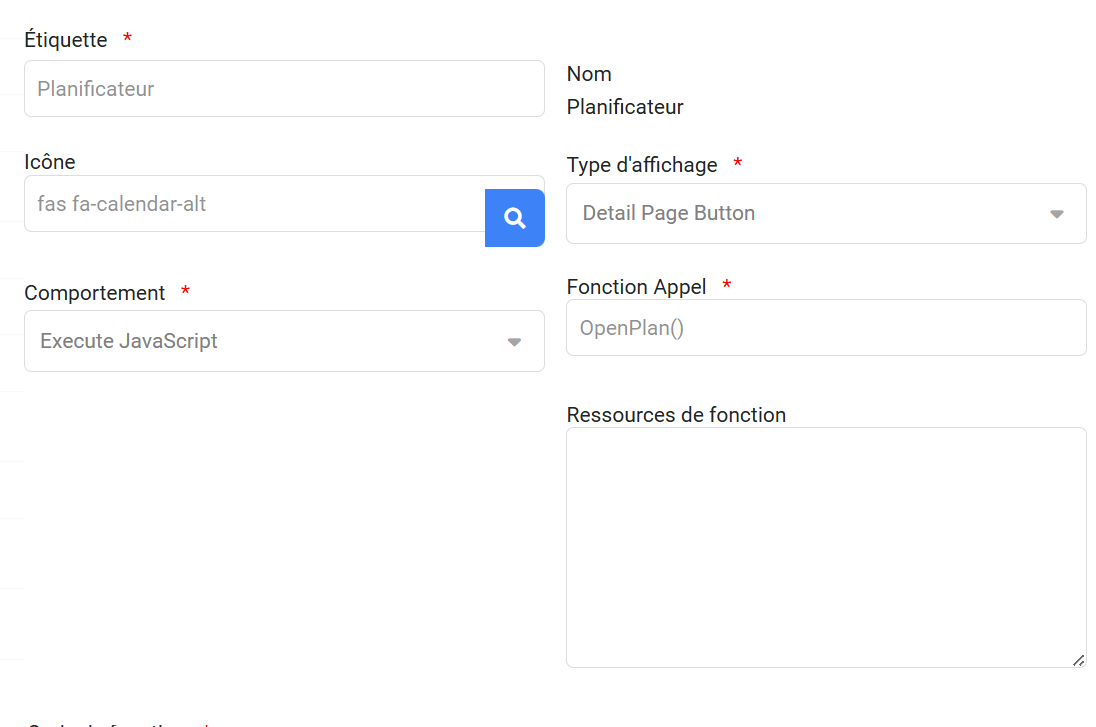
Copy and paste the following JavaScript code into the code section (the code is identical regardless of language):
function OpenPlan() {
  var RecordID = GetRecordGUID();
  var modelName = window.location.search.slice(1).split("&")[0].split("=")[1];
  var userinfo = GetCurrentloggedInUserInfo();
  var orgInfo = GetOrganizationIDForAllUsers();
  openPopup();
  function openPopup() {
    var popup = createPopup();
    document.body.appendChild(popup);
    var popupContent = createPopupContent();
    popup.appendChild(popupContent);
    var closeBtn = createCloseButton(popup);
    popupContent.appendChild(closeBtn);
    var loadingSpinner = createLoadingSpinner();
    popupContent.appendChild(loadingSpinner);
    var iframe = createIframe(RecordID, modelName, userinfo, loadingSpinner, orgInfo);
    popupContent.appendChild(iframe);
  }
  function createPopup() {
    var popup = document.createElement("div");
    popup.id = "myPopupPlanificateur";
    popup.style.cssText = "position: fixed; z-index: 9999999; left: 50%; top: 50%; transform: translate(-50%, -50%); width: 100%; height: 100%; overflow: auto; background-color: rgba(0,0,0,0.4); display: flex; justify-content: center; align-items: center;";
    return popup;
  }
  function createPopupContent() {
    var popupContent = document.createElement("div");
    popupContent.id = "popupContentPlanificateur";
    popupContent.style.cssText = "background-color: white; padding: 0px; border: 1px solid #888; border-radius: 16px; width: 95%; height: 100%; position: relative; box-shadow: 0 8px 30px rgba(0,0,0,0.25); overflow: hidden;";
    return popupContent;
  }
  function createCloseButton(popup) {
    var closeBtn = document.createElement("span");
    closeBtn.innerHTML = "×";
    closeBtn.style.cssText = "position: absolute; top: 8px; right: 16px; font-size: 28px; font-weight: bold; cursor: pointer; z-index: 10;";
    closeBtn.onclick = function () {
      popup.style.display = "none";
      location.reload(true);
    };
    return closeBtn;
  }
  function createLoadingSpinner() {
    var loadingSpinner = document.createElement("div");
    loadingSpinner.id = "loadingSpinnerPlanificateur";
    loadingSpinner.style.cssText = "position: absolute; top: 50%; left: 50%; transform: translate(-50%, -50%);";
    loadingSpinner.innerHTML = '';
    var style = document.createElement("style");
    style.textContent = `
    #loadingSpinnerPlanificateur .spinner {
      border: 4px solid rgba(0, 0, 0, 0.1);
      border-left: 4px solid #3498db;
      border-radius: 50%;
      width: 40px;
      height: 40px;
      animation: spin 1s linear infinite;
    }
    @keyframes spin {
      0% { transform: rotate(0deg); }
      100% { transform: rotate(360deg); }
    }
    `;
    loadingSpinner.appendChild(style);
    return loadingSpinner;
  }
  function createIframe(RecordID, modelName, userinfo, loadingSpinner, orgInfo) {
    var iframe = document.createElement("iframe");
    loadingSpinner.style.display = "block";
    iframe.addEventListener("load", function () {
      loadingSpinner.style.display = "none";
    });
    iframe.src = `https://planificateur.cirrus-shield.net/${userinfo["Language"]}/planificateur-ressource?orgId=${orgInfo}&resourceId=${RecordID}&TimeZoneSidKey=${userinfo["TimeZoneSidKey"]}&LocaleSidKey=${userinfo["LocaleSidKey"]}`;
    iframe.style.cssText = "width: 100%; height: 100%; border: none; border-radius: 0 0 12px 12px;";
    return iframe;
  }
}
Don’t forget to set the profiles that have access to this button: click the Profiles tab, then the edit button (blue pencil).
Mission
Do the same for the object that represents the mission in your environment, using this JavaScript code:
function OpenPlan() {
  var RecordID = GetRecordGUID();
  var modelName = window.location.search.slice(1).split("&")[0].split("=")[1];
  var userinfo = GetCurrentloggedInUserInfo();
  var orgInfo = GetOrganizationIDForAllUsers();
  openPopup();
  function openPopup() {
    var popup = createPopup();
    document.body.appendChild(popup);
    var popupContent = createPopupContent();
    popup.appendChild(popupContent);
    var closeBtn = createCloseButton(popup);
    popupContent.appendChild(closeBtn);
    var loadingSpinner = createLoadingSpinner();
    popupContent.appendChild(loadingSpinner);
    var iframe = createIframe(RecordID, modelName, userinfo, loadingSpinner, orgInfo);
    popupContent.appendChild(iframe);
  }
  function createPopup() {
    var popup = document.createElement("div");
    popup.id = "myPopupPlanificateur";
    popup.style.cssText = "position: fixed; z-index: 9999999; left: 50%; top: 50%; transform: translate(-50%, -50%); width: 100%; height: 100%; overflow: auto; background-color: rgba(0,0,0,0.4); display: flex; justify-content: center; align-items: center;";
    return popup;
  }
  function createPopupContent() {
    var popupContent = document.createElement("div");
    popupContent.id = "popupContentPlanificateur";
    popupContent.style.cssText = "background-color: white; padding: 0px; border: 1px solid #888; border-radius: 16px; width: 95%; height: 100%; position: relative; box-shadow: 0 8px 30px rgba(0,0,0,0.25); overflow: hidden;";
    return popupContent;
  }
  function createCloseButton(popup) {
    var closeBtn = document.createElement("span");
    closeBtn.innerHTML = "×";
    closeBtn.style.cssText = "position: absolute; top: 8px; right: 16px; font-size: 28px; font-weight: bold; cursor: pointer; z-index: 10;";
    closeBtn.onclick = function () {
      popup.style.display = "none";
      location.reload(true);
    };
    return closeBtn;
  }
  function createLoadingSpinner() {
    var loadingSpinner = document.createElement("div");
    loadingSpinner.id = "loadingSpinnerPlanificateur";
    loadingSpinner.style.cssText = "position: absolute; top: 50%; left: 50%; transform: translate(-50%, -50%);";
    loadingSpinner.innerHTML = '';
    var style = document.createElement("style");
    style.textContent = `
    #loadingSpinnerPlanificateur .spinner {
      border: 4px solid rgba(0, 0, 0, 0.1);
      border-left: 4px solid #3498db;
      border-radius: 50%;
      width: 40px;
      height: 40px;
      animation: spin 1s linear infinite;
    }
    @keyframes spin {
      0% { transform: rotate(0deg); }
      100% { transform: rotate(360deg); }
    }
    `;
    loadingSpinner.appendChild(style);
    return loadingSpinner;
  }
  function createIframe(RecordID, modelName, userinfo, loadingSpinner, orgInfo) {
    var iframe = document.createElement("iframe");
    loadingSpinner.style.display = "block";
    iframe.addEventListener("load", function () {
      loadingSpinner.style.display = "none";
    });
    iframe.src = `https://planificateur.cirrus-shield.net/${userinfo["Language"]}/planificateur?orgId=${orgInfo}&missionId=${RecordID}&TimeZoneSidKey=${userinfo["TimeZoneSidKey"]}&LocaleSidKey=${userinfo["LocaleSidKey"]}`;
    iframe.style.cssText = "width: 100%; height: 100%; border: none; border-radius: 0 0 12px 12px;";
    return iframe;
  }
}
